
You don’t need a better prompt. You need a contract.
That has been the missing piece in a lot of the vibe coding work I have been teaching recently. People usually have a decent idea of what they want to build. They know the general shape of the app. They can describe the audience. They can usually name the first few features.
Then they hand that idea to an AI coding tool and expect the tool to behave like a senior product engineer.
Sometimes it does.
Sometimes it behaves like a very enthusiastic intern with root access.
The problem is not that the model lacks knowledge. These tools have more technical knowledge than any individual developer ever will. The problem is that knowledge without constraints is not product judgment. If you do not give the tool a clear scope, a working style, and a visual target, it will happily build something big, impressive, expensive, and wrong.
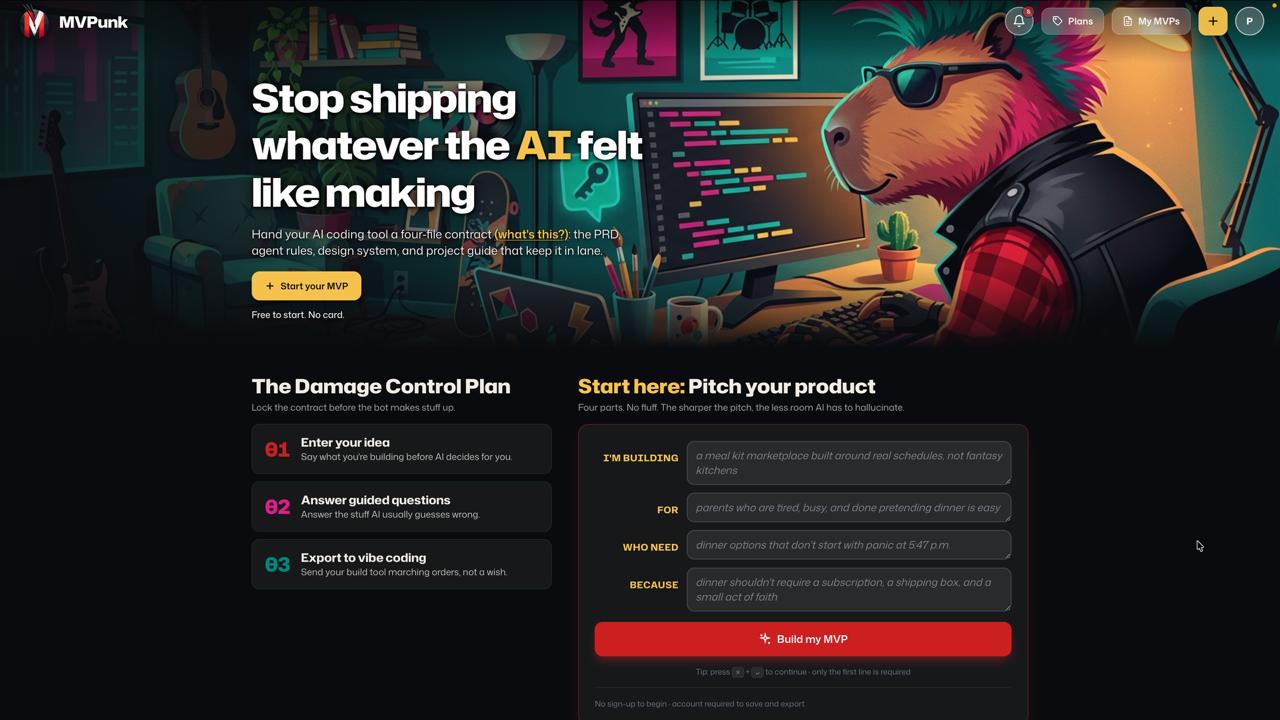
That is why I built MVPunk.
It creates a four-file contract for your AI coding tool: PRD.md, AGENTS.md, DESIGN.md, and CLAUDE.md. The goal is simple: give the tool enough structure to stay pointed at the product you actually meant to build.
Why Prompts Are Not Enough
Prompts are great for intent.
“Build me a campus textbook marketplace” tells the model the direction. It does not tell the model what kind of student is using it, what the first useful version needs to do, what should be left out, what design system to follow, or when the tool should stop and ask instead of inventing.
That is where builds start to drift.
You ask for a lightweight marketplace and get a multi-role SaaS dashboard. You ask for a landing page and get a component library. You ask for an MVP and get subscriptions, admin analytics, notifications, settings, profile pages, dark mode, onboarding, and a database schema that looks like it escaped from an enterprise procurement meeting.
Feature creep used to be a people problem. With AI coding tools, feature creep can now happen at machine speed. Very fancy. Very dangerous.
A product requirements document helps. A PRD gives the build a center of gravity. Atlassian describes a product requirements document as a way to define a product’s purpose, features, user needs, and success criteria so teams stay aligned. That still matters, but AI tools need more than product scope.
- They also need operating rules.
- They need design boundaries.
- They need a router that tells them which file to consult before they start coding.
- That is the difference between a prompt and a contract.
The Four Files MVPunk Generates
MVPunk turns a product idea into four practical files. These are not random docs. They match the patterns that agentic coding tools are already starting to recognize.
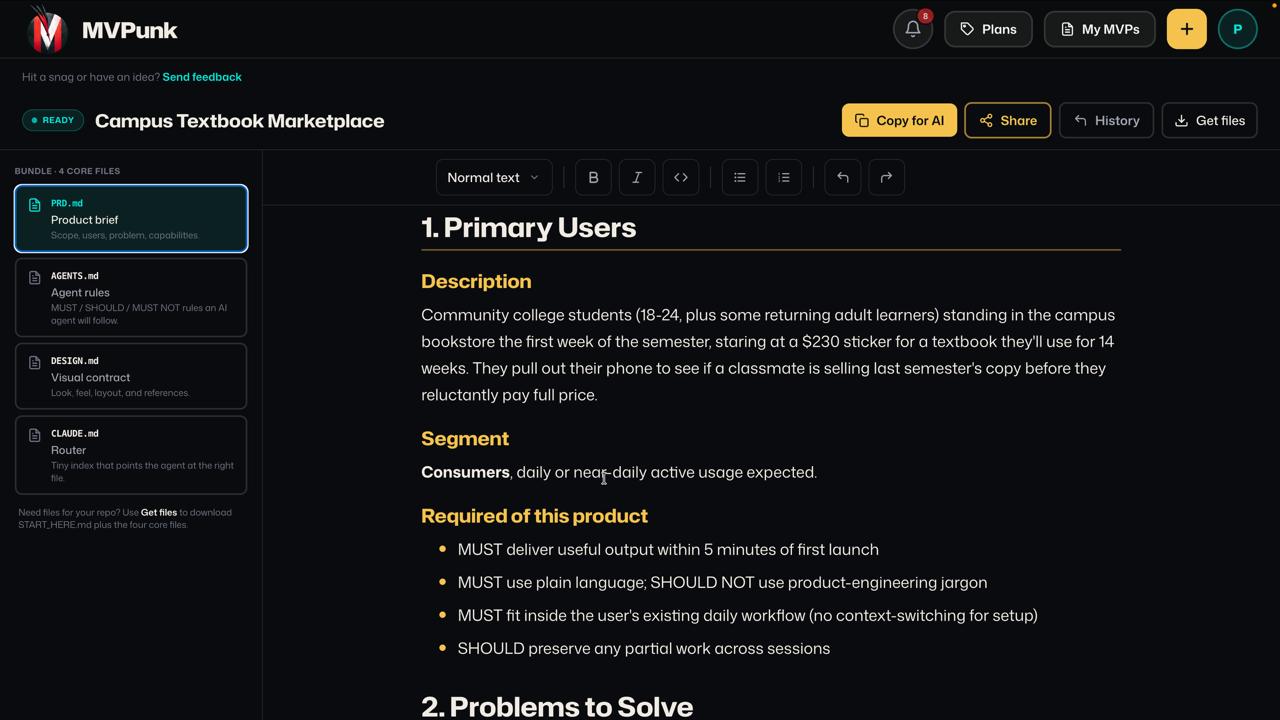
In the screenshot above, the example project is a “Campus Textbook Marketplace.” The left rail shows the bundle MVPunk creates:
PRD.mdAGENTS.mdDESIGN.mdCLAUDE.md
Each file has a different job.
PRD.md: Product Scope
PRD.md is the product brief.
It captures the pitch, primary users, problems to solve, core capabilities, success criteria, constraints, and v1 scope. This is where the tool learns what the product is and, just as important, what it is not.
For the textbook marketplace example, the primary user is not “students.” That is too vague. The generated brief describes community college students standing in the bookstore during the first week of the semester, staring at a $230 textbook and checking whether a classmate is selling last semester’s copy.
That is much better than “students need books.”
Specific context changes the build. It tells the AI tool the product needs to work on a phone, during a time-sensitive moment, with plain language, fast search, and almost no setup friction. You do not get those decisions from a generic prompt.
AGENTS.md: Working Rules
AGENTS.md is the behavior contract.
This file tells an AI coding agent how to work. It defines MUST, MUST NOT, and SHOULD rules. It gives the tool boundaries around scope, input handling, accessibility, implementation discipline, and out-of-scope tripwires.
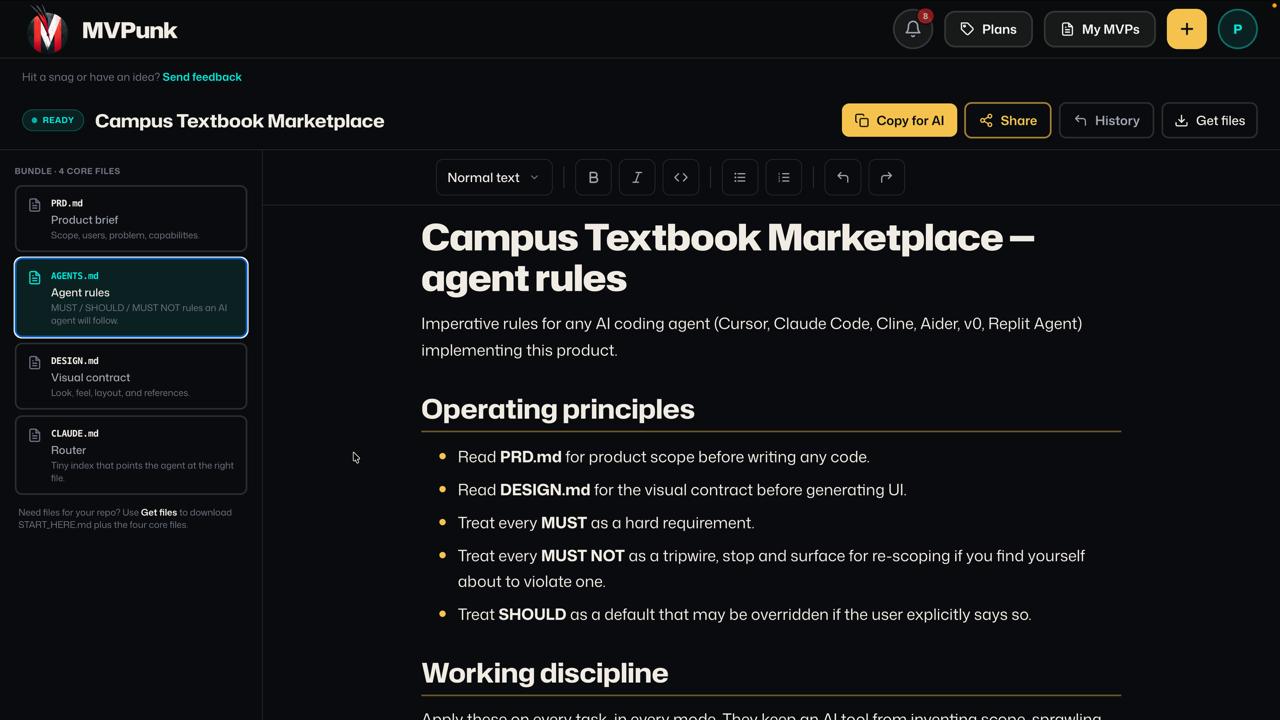
OpenAI Codex already supports AGENTS.md as project instructions, which makes this pattern especially useful for agentic workflows. The important part is not the filename by itself. The important part is that the instructions live in the repo, next to the work, where the agent can reload them.
That matters because “remember what I said earlier” is not a build strategy.
If a tool starts inventing admin dashboards, real-time chat, native mobile apps, or a payment system you did not ask for, AGENTS.md gives you a place to say: stop. That is not v1.
DESIGN.md: Visual Contract
DESIGN.md is the design source of truth.
Most AI app generators can produce something that looks polished in isolation. The problem is consistency. Without a visual contract, the model makes local decisions: a slightly different button here, a new shade there, an oversized card somewhere else, a random gradient because apparently gradients are how AI says “software.”
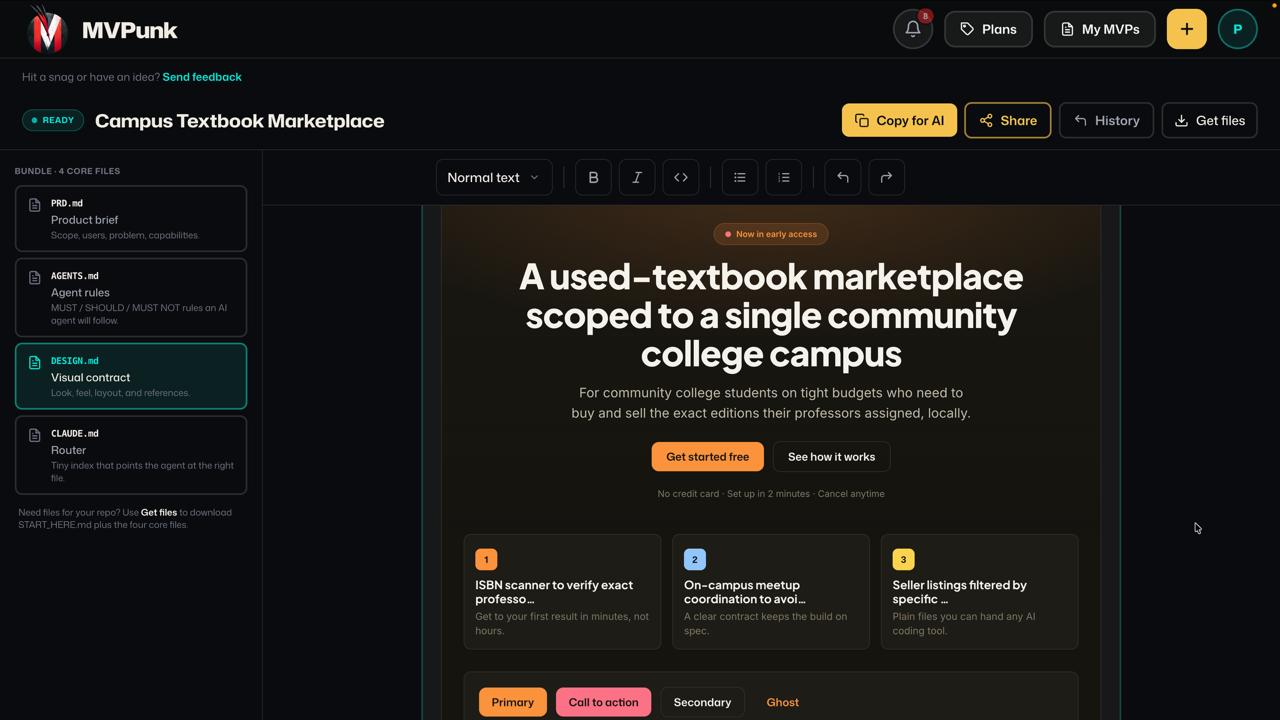
DESIGN.md keeps the visual system explicit. It can include typography, color tokens, spacing, radius, layout rules, accessibility requirements, and reference screenshots.
This is especially useful when you are building with tools like v0, Lovable, Bolt, Replit Agent, Cursor, Claude Code, or Codex. The design file gives the AI something concrete to check before it generates UI. It also gives you a place to correct taste drift. If the build starts to feel wrong, you update the contract instead of fighting the same battle in every prompt.
CLAUDE.md: Router
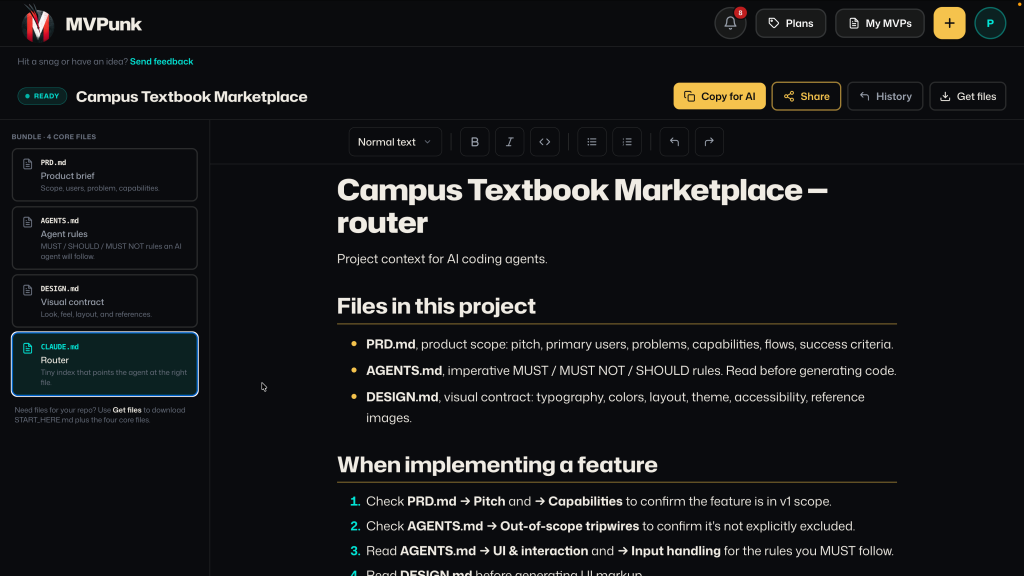
CLAUDE.md is the project router.
Claude Code uses CLAUDE.md as a memory and instruction file for project context, and Anthropic documents how Claude loads project memory from CLAUDE.md files in its Claude Code memory docs. MVPunk uses that pattern to create a small routing file that points the agent to the right source:
- Check
PRD.mdfor product scope. - Check
AGENTS.mdfor rules and tripwires. - Check
DESIGN.mdfor visual decisions. - Ask before coding when something is ambiguous.
That last line is not decorative. It is the part people forget.
Good AI coding workflows are not “type one perfect prompt and walk away.” They are steering systems. The tool can be superhuman at implementation, but it still needs direction, constraints, and review.
The START_HERE Pattern
MVPunk also generates a START_HERE.md file when you download the bundle.
That file gives the AI tool a kickoff recipe. The generated instructions tell the tool to save the files at the project root, read them in order, ask clarifying questions, summarize what it will build and what it will not build, then wait for confirmation before writing code.
That sequence matters:
- Save the files.
- Read the files.
- Ask questions.
- Summarize the scope.
- Confirm before coding.
Most bad AI builds skip steps 2 through 4.
They go straight from “idea” to “implementation,” which feels fast until you spend three hours undoing a beautiful mess.
MVPunk also includes tool-specific paste recipes. The site has guidance for Lovable, Cursor, Claude Code, Codex, v0, Bolt, Replit Agent, and other tools. That is important because these environments do not all handle project context the same way.
Cursor and Claude Code are happiest when the files live in the repo. v0 and Bolt often need a concentrated paste. Codex can be started with the relevant files passed in. Lovable needs a careful first message because the first prompt carries so much of the project context.
Same contract. Different delivery method.
Why This Works Better Than a Long Prompt
Long prompts have two problems.
First, they are hard to maintain. If your scope changes, you edit a wall of text and hope the next tool reads the right part.
Second, they mix concerns. Product scope, agent behavior, design rules, and tool routing all get jammed into one blob. That makes the prompt harder for humans to review and easier for models to partially ignore.
Separate files create cleaner responsibilities:
PRD.mdanswers: what are we building?AGENTS.mdanswers: how should the AI behave while building it?DESIGN.mdanswers: what should it look and feel like?CLAUDE.mdanswers: where should the agent look before acting?START_HERE.mdanswers: how do I hand this contract to the tool?
This is also easier to teach.
When I am working with developers, designers, founders, or product people who are learning vibe coding, the biggest improvement is not usually a clever prompt trick. It is getting them to be more specific about decisions they already know but have not written down.
Who is this really for?
What is the first useful version?
What is explicitly out of scope?
What should the tool never do without asking?
What does “done” mean?
Those answers make AI tools dramatically more useful.
Free VS AI-Assisted Versions
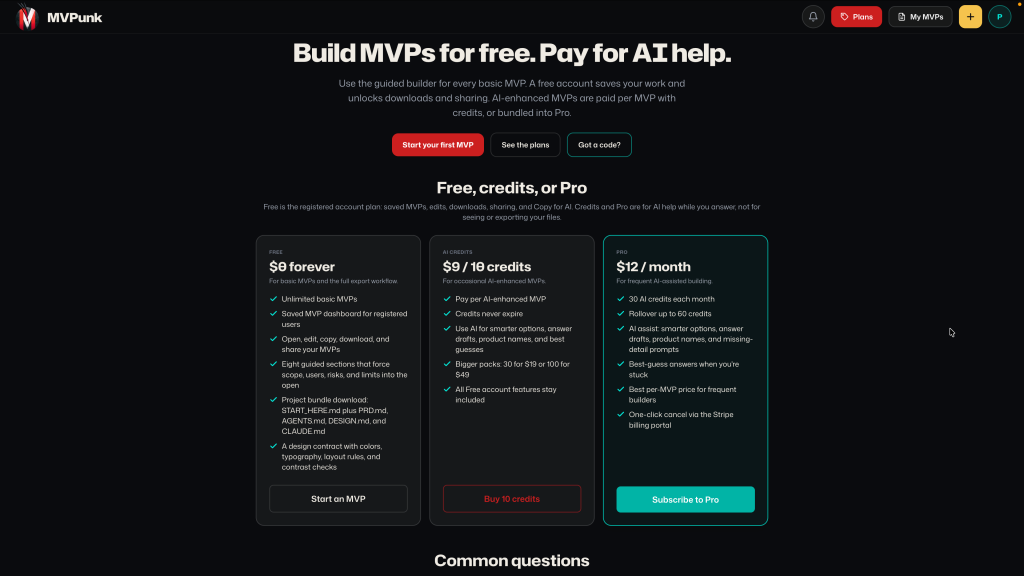
MVPunk is free to use for the basic experience.
The free workflow lets you create the core contract files and hand them to your AI coding tool. I also added an AI-enhanced experience that asks follow-up questions to sharpen the docs. That part uses tokens, so it has pricing attached. But the basic workflow exists because this should be a normal part of building with AI, not a luxury upgrade.
The AI follow-up questions are useful because most people underspecify their first idea. They say “a marketplace” when they mean “a phone-first exchange for students during a two-week buying window.” They say “simple dashboard” when they mean “three actions, no admin mode, no analytics, no settings page.”
The follow-up flow is there to pull those details out before the coding tool starts guessing.
Guessing is where the trouble starts.
The Bigger Lesson for Vibe Coding
Vibe coding is not about being vague and hoping the tool figures it out. That might be the meme version. It is not the professional version.
The professional version is closer to product direction plus implementation leverage. You use the AI tool to move faster, but you still define the job. You still decide what matters. You still set the boundaries.
That is why contracts are becoming a pattern. Not legal contracts. Build contracts.
Files that say:
- This is the user.
- This is the product.
- This is v1.
- This is not v1.
- This is how the agent should work.
- This is the design language.
- This is what to check before coding.
That is the part that makes the future exciting. These tools can make individual builders wildly more capable, but only when we stop treating them like magic prompt boxes and start treating them like collaborators that need a clear operating model.
The assisted workforce is going to be very real. Developers, designers, product people, and instructors who learn how to steer these tools will have an unfair advantage. Not because they found the perfect prompt, but because they learned how to turn intent into executable context.
MVPunk is my attempt to make that workflow easier to teach, easier to repeat, and harder to mess up.
Try it at mvpunk.com, generate the four files, drop them into your next AI-assisted build, and watch how differently the tool behaves when it has a contract instead of a wish.